31 October 2018

Textarea Tabs + Syntax Highlighting


I don't know why I have this on my blog, But I liked this.


Code Reference: Ashley Ktorou


Word Counter - Count Words & Character | DigiWorks Tool

Start typing, or copy and paste your document below...

0 words | 0 characters.

Knowing word and character counts are really important. Be it an essay, or a book, or academic writing or a blog article. Being a blogger I find myself using Word Counters all the time. So I created one for myself and my fellow blogger.

Tip: Bookmark this tool to save time.

To start, simply write or paste the text into the text areas and watch the results appear immediately. You can also clear your text anytime you want by clicking on Reset.

Code Reference: word counter ⚬ reset

Simple HTML Entities Encoder/Decoder - DigiWorks Tool

HTML entity encoder

Paste your html code below...
Copy the encoded code...


some text

5 September 2018

How to add Google Tag Manager to Blogger (Blogspot) Blog

Google Tag Manager helps you, as you have already guessed it, to manage marketing tags in your websites and mobile apps.

But installing Google Tag Manager in Blogger Blog is a little tricky as it is not exactly same as installing it in WordPress or any other website, you have to make a very small change in the GTM Container Snippet then only it will work.

So if you already know how to Install GTM in WordPress and in other places, you facing problem only with Blogger, then do this -

In the GTM Container Snippet (in <head> Script) find dl=l!='dataLayer'?'&l='+l:'';, change the ampersand (&) to its HTML encoded version (&amp;)

So, the string
dl=l!='dataLayer'?'&l='+l:'';
will look like this
dl=l!='dataLayer'?'&amp;l='+l:'';

Save the changes and you are done.

If you are completely new to Google Tag Manager, read it entirely. Though you can skip and jump to any section using these navigation links below -

Introduction Google Tag Manager
Why use Google Tag Manager
Add Google Tag Manager to Blogger Blog (Step by Step) - follow these steps to do it smoothly, avoid making any mistake
Video Tutorial - you can skip to it if you do not like to read
Google Tag Manager Installation tips - there are several things you can do wrong

22 August 2018

How to Remove URLs from Google's Index | Get rid of Old Links n 404s

It is no secret that if there are lots of Broken Links (404 errors) and Thin Content on your website, it hurts your website ranking in Google. If you are serious about search engine traffic then often you need to remove unwanted URLs from Google's Index.

Remove URLs from Google's Index
Even if I did not care about search engine traffic in particular, still I would want to have only quality pages live on my website. I prefer everything I own to be neat and clean.

Let's back to the topic, no matter how careful you are while building your website or publishing content, you get some of those ugly pages and URLs.

23 July 2018

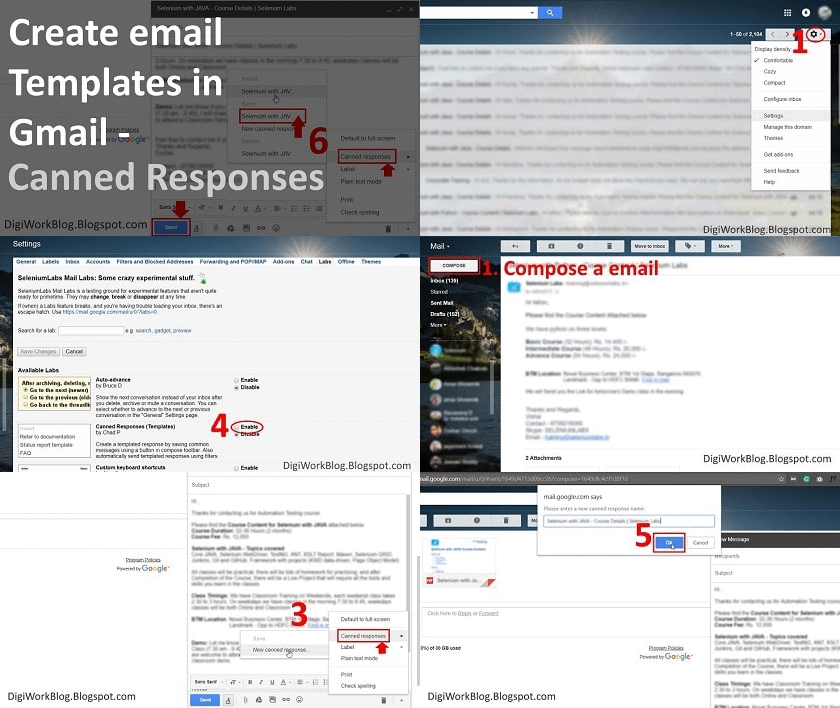
How to Create Email Templates in Gmail (with Attachments) - Step by Step

Creating email templates in Gmail with attachment
If you need to send same email messages to people again and again, and you find yourself copying email content from somewhere and sending to people every time, it is better to create email templates or so-called Canned Responses in Gmail, it will allow you to type less and respond faster and be more efficient with your emails.

My current process for sending these emails involves - copying the message text from previously sent emails, composing a new email and pasting the content, editing the name and other information, adding attachments, then sending. The boring most part I find is to find the email to copy the text from. Really inefficient!

I do not want to use a CRM like Zoho, but I want the template feature of a CRM, where whenever I want to send an email I can insert a template, do little modification if I need, enter the email ID and send. Quick and Easy!

We will do the same in Gmail.

Popular Posts