7 October 2020

DDIP Week 1 Assignment - My 2.0 Version

 It is an assignment of the Digital Deepak Internship Program. I needed to write about how my 2.0 version will look like. I am writing as a journalist would in the year 2023.

Here is how my 2.0 version will look like in 2023.

30 June 2020

Creating Video Essays

There are a lot of things that I want to learn. And probably it is the main reason I am not learning any properly, that I want to learn A LOT OF THINGS.

Anyway, everyone does not need to be successful, but everyone should be trying what they want.

So, one of the things I want to learn is - Creating Awesome Video Essays.

Video essays are amazing because ...

Well, I will not say they much more awesome than other forms, when there are awesome text-based essays like  Roger Federer as Religious Experience by David Foster Wallace, illustrated essays like The Fermi Paradox by Tim Urban. Even there must nice audio essays, but I don't know.

25 June 2020

Adding Image Lightbox to Blogger blogs - Blogger Lightbox Code

Sometimes blogger templates come with lightbox but a many time they don't.

Or sometimes you have the lightbox but do not like the style of it.

Click on the image to see how they look at an image with lightbox looks


Here is one style you may like.

FancyBox 3 Lightbox for Blogger

FancyBox is an amazing jQuery for lightboxes, which is an industry-standard and used in many popular websites.

Here I have created a demo website for that

21 June 2020

Is Original Content that important for SEO?

Michael Angelo’s painting on top of the Palace of Versailles


Many people think that creating original content consistently is the key to get search engine traffic.
Well, this is really important, but it is just a part of the equation.

Today I am gonna show you creating original content is not always as much of a help as you want it to be.

This topic is so vast that an entire book can be written on this topic. But in this post, I will discuss an isolated incident, so that it is easier to focus.

18 May 2020

Things I'm into now - Converting web app into Mobile App

A quick update on one of the things I am up to now (Yeah, I am stupid, get involved in so many projects all at a time).

I am just trying to create an eCommerce website with my friend. He has a business idea that we wanted to try.

It will be local business related - I'm not interested to discuss all of it now. But I was building an eCommerce website, which is just easy with WooCommerce but it has some custom features which is not that common, so we are struggling.

Also, for the business to be successful, we think a mobile app will do a better job.

I do not have programming experience, but I figure out a small front end and UI related stuff but have no experience with app development. And my friend has some coding experience, but not enough to completely handle complete full-stack development also not experience with Mobile app development.

So we are trying to figure out the easiest, fastest and cheapest way to build one.

13 May 2020

Fixed: Blogger Images Getting Distorted in Mobile Devices

If you have been using Blogger, you may have noticed some Blogger Templates come with really frustrating Images sizes.

There 2 these images related issue which is common in many Blogger Templates - 

1. The original size images get stretched beyond the space provided for the posts and mess with the sidebar Blogspot blogs.

The image is Stretched
If the image is wider than the space provided for a blogger post, the image stretches beyond the post area and messes up with the sidebar.

14 September 2019

How to Remove Blog Title from Post Title in Blogger [Blogspot]???


Blogger Edit HTML
title><data:blog.pagetitle/></title>

Replace the above code with this:
<b:if cond= 'data:blog.pageType == &quot;index&quot;'>
<title><data:blog.title/></title>
<b:else/>
<title><data:blog.pageName/></title>
</b:if>


23 April 2019

Skyscraper Technique Simplified (advanced backlink building strategy)

The Skyscraper technique is one of the best link building technique in 2019 (discovered by Brian Dean of Backlinko).

Image Source: Backlinko
Here I am trying to present the tactics in a super easy way. With a free powerful backlink finder tool as a bonus.

Basically, you have to find outdated content with a lot of links and create content with the same topic covering more (key features, well researched, visual elements, in-depth) than that. Be careful your content should be unique. That means your content should provide more unique value.

Note (01 Apr 2017): This article was originally published in Blogger Funda Group, as Funda Tip 3 by Nilanjan Mukherjee 

After publishing your content, just reach out to those who linked the outdated content. Share your content's comparison with the outdated one in a nutshell. Suggest them to use your content as an alternative.

This Image can save you some time for competition Analysis


Competition analysis is a major task in SEO.

It is not a good practice to spend the time creating content that would never rank in Google because of the tough competition unless you absolutely love to create that content. In that case, by all means, just go for it, create the content.

What I'm sharing can save a little or huge time depending on the style of your work for researching competition.

It is an image, which is actually a list of websites, is taken from a great article titled "How 16 Companies are Dominating the World's Google Search Results" by Glen Allsopp on the DETAILED blog.

31 January 2019

Internal Linking Strategy 2019 | Get most out of Internal Linking

Interlinking properly: interlinking has huge effect, though have already mentioned above, but then you didn't have the overall picture, which is necessary for interlinking.

[This articles is not complete, this just for me, don't blame me if you waste your time reading rubbish]

You have to create a strategy on which pages should get more internal linking from strong pages than others.

26 January 2019

Google Star Ratings for Blogspot (blogger) | Google Rich Snippet

Star rating on Google has a great role in terms of SEO. As it attracts more eyes and increases Click Through Rate dramatically.

These are done through something called Schema Markup or Structured data, everything about which can be found on Schema.org.

I had experience using Schema Markup in WordPress website, but today I thought to try it on Blogspot blog as well. Actually, the idea I got is from a Facebook post in Blogger's Funda group.

Let's see how to get those five stars on Google Search.

19 January 2019

Image Optimization for Google Maps (Google My Business) | Local SEO

Good images in your Google My Business account helps you rank higher in Google Maps and eventually appear on the Local Pack. Increasing you more visibility, which leads to more leads, which leads to more sale.

I have noticed for many types of queries, for local services, it is difficult to beat the Giant websites and rank your own website. For instance, check keyword like "hotels in bangalore", the bigger websites like TripAdvisor, MakeMyTrip, Goibibo, booking.com, yatra.com are killing it.
all organic results are from larger websites, none of the individuals and local businesses

17 January 2019

Stop Google Analytics from tracking your own visits to your website (Best Method)

We keep checking our website so many times. Why not? It is our property, everyone loves checking one's property. Other than that other unavoidable reasons for checking out our website is while creating or modifying something on our website we must check out our websites several times.

But the problem is every action gets tracked by Google Analytics.

Which corrupts our Analytics Data. You do not want to see your own visit data in analytics, you want only other actual visitor.

If the site is small, there is very little traffic, this can be bummer. As, especially, till few months from the time the website was first live, you might get 100 visits from genuine visitors and 1000 visits of your own or any developer working in the website, or your friends and family members.


Here is how to Keep Google Analytics from Tracking Your Own Visits to Your Website

There are 2 major ways to do that, I will mention both but explain in details the second one as, now I started doing this with the 2nd method, the second method is more useful to me and I think it will be for most of the people.

Exclude Your IP Address in Google Analytics


24 December 2018

0 subcriber specal

Found the coolest video on the Internet.

This kid created a 0 subscriber special episode as well as on 1 subscriber.

This is amazing. Being in the marketing industry I see people crying for subscribers, views, traffic money without even doing anything at all.

This kid has now more than 300K but deserves more!!! go subscribe


He also made 1 Sub special. Even though the one was his grandma.


Thank you...

31 October 2018

Textarea Tabs + Syntax Highlighting


I don't know why I have this on my blog, But I liked this.


Code Reference: Ashley Ktorou


Word Counter - Count Words & Character | DigiWorks Tool

Start typing, or copy and paste your document below...

0 words | 0 characters.

Knowing word and character counts are really important. Be it an essay, or a book, or academic writing or a blog article. Being a blogger I find myself using Word Counters all the time. So I created one for myself and my fellow blogger.

Tip: Bookmark this tool to save time.

To start, simply write or paste the text into the text areas and watch the results appear immediately. You can also clear your text anytime you want by clicking on Reset.

Code Reference: word counter ⚬ reset

Simple HTML Entities Encoder/Decoder - DigiWorks Tool

HTML entity encoder

Paste your html code below...
Copy the encoded code...


some text

5 September 2018

How to add Google Tag Manager to Blogger (Blogspot) Blog

Google Tag Manager helps you, as you have already guessed it, to manage marketing tags in your websites and mobile apps.

But installing Google Tag Manager in Blogger Blog is a little tricky as it is not exactly same as installing it in WordPress or any other website, you have to make a very small change in the GTM Container Snippet then only it will work.

So if you already know how to Install GTM in WordPress and in other places, you facing problem only with Blogger, then do this -

In the GTM Container Snippet (in <head> Script) find dl=l!='dataLayer'?'&l='+l:'';, change the ampersand (&) to its HTML encoded version (&amp;)

So, the string
dl=l!='dataLayer'?'&l='+l:'';
will look like this
dl=l!='dataLayer'?'&amp;l='+l:'';

Save the changes and you are done.

If you are completely new to Google Tag Manager, read it entirely. Though you can skip and jump to any section using these navigation links below -

Introduction Google Tag Manager
Why use Google Tag Manager
Add Google Tag Manager to Blogger Blog (Step by Step) - follow these steps to do it smoothly, avoid making any mistake
Video Tutorial - you can skip to it if you do not like to read
Google Tag Manager Installation tips - there are several things you can do wrong

22 August 2018

How to Remove URLs from Google's Index | Get rid of Old Links n 404s

It is no secret that if there are lots of Broken Links (404 errors) and Thin Content on your website, it hurts your website ranking in Google. If you are serious about search engine traffic then often you need to remove unwanted URLs from Google's Index.

Remove URLs from Google's Index
Even if I did not care about search engine traffic in particular, still I would want to have only quality pages live on my website. I prefer everything I own to be neat and clean.

Let's back to the topic, no matter how careful you are while building your website or publishing content, you get some of those ugly pages and URLs.

23 July 2018

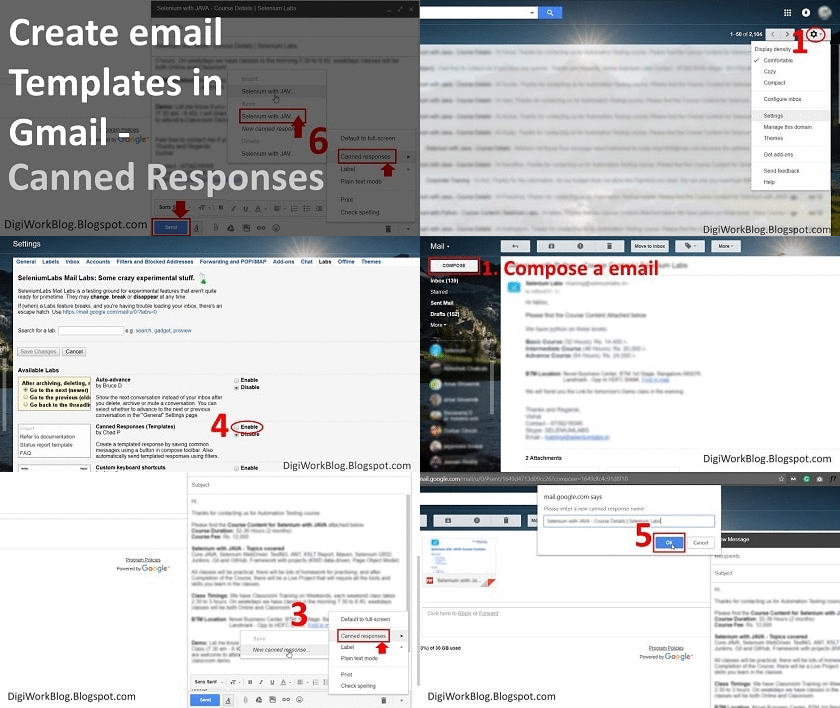
How to Create Email Templates in Gmail (with Attachments) - Step by Step

Creating email templates in Gmail with attachment
If you need to send same email messages to people again and again, and you find yourself copying email content from somewhere and sending to people every time, it is better to create email templates or so-called Canned Responses in Gmail, it will allow you to type less and respond faster and be more efficient with your emails.

My current process for sending these emails involves - copying the message text from previously sent emails, composing a new email and pasting the content, editing the name and other information, adding attachments, then sending. The boring most part I find is to find the email to copy the text from. Really inefficient!

I do not want to use a CRM like Zoho, but I want the template feature of a CRM, where whenever I want to send an email I can insert a template, do little modification if I need, enter the email ID and send. Quick and Easy!

We will do the same in Gmail.

Popular Posts